 Episeed
Inside the workspace
Literature discovery with a research plan you approve
Turn a research question into a plan you review and approve, then inspect the report, sources, evidence and activity. AI-assisted, and it needs a configured model.
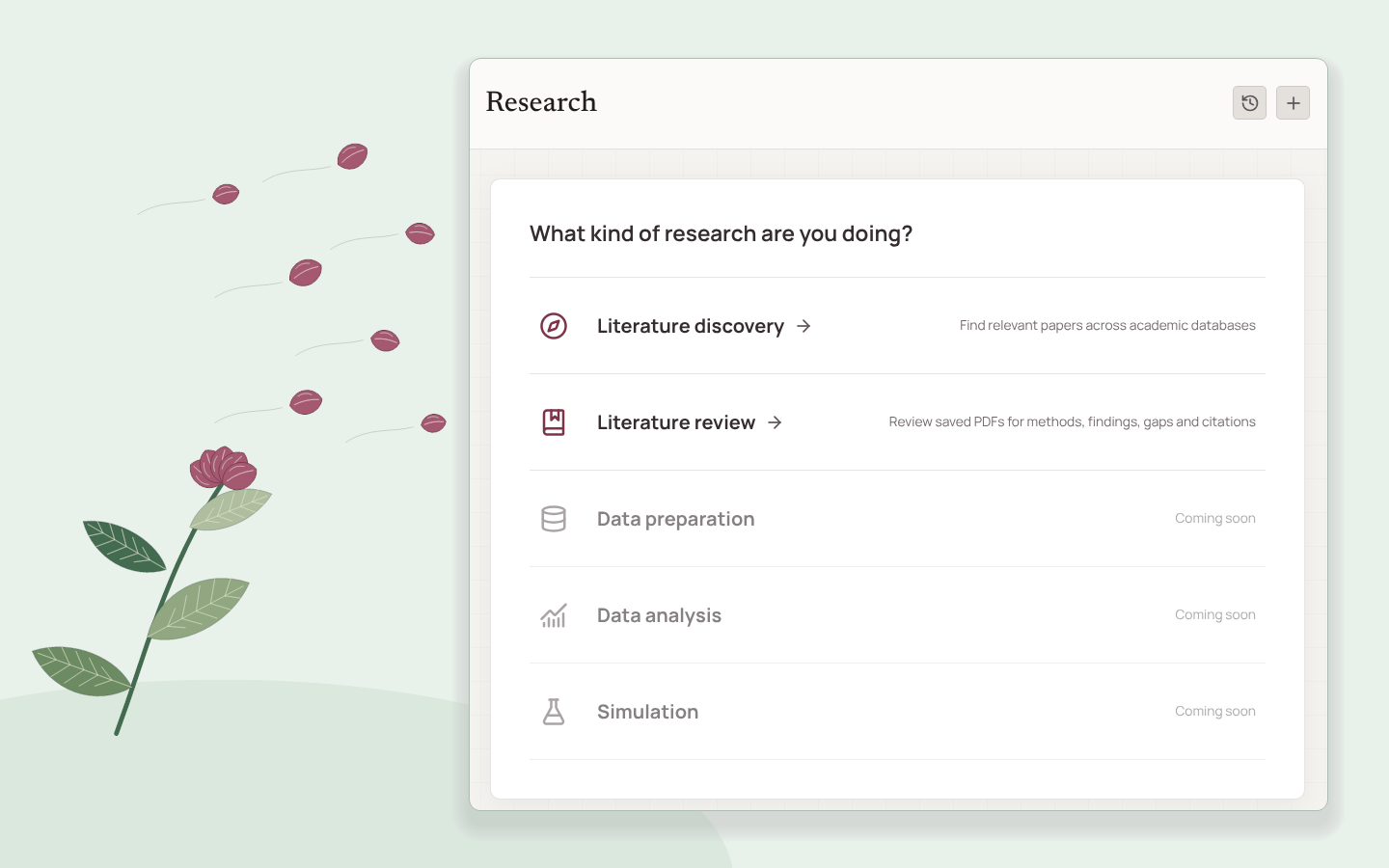
Research in Episeed helps you move from a question to a map of the literature you can inspect: relevant sources, supported findings, disagreements and gaps worth investigating. It is AI-assisted preparation for your own reading and writing, not a replacement for judging the evidence.
Unlike reading, notes and writing, this workspace needs a configured AI model.
Choose a starting point
- Literature discovery finds relevant work through the available academic and web search services.
- Literature review compares PDFs already saved in your Library for methods, findings, limitations and citations.
Literature review here compares a body of literature. Feedback on a single manuscript belongs in the separate manuscript review workspace.
Write a brief, then approve the plan
- Write a focused question and explain what you need to understand. Add scope, relevant studies, exclusions or publication years where they help.
- Choose the depth and the search services. Options include Tavily, OpenAlex, Semantic Scholar and Crossref; which ones you can use depends on your configured access.
- Prepare the research plan. Read and edit the proposed search queries, or the analytical themes and questions when you are working from saved PDFs.
- Check the limits, selected sources, services and data-sharing notice. Nothing runs until you approve it.
The aim is a bounded investigation you can inspect, not an open-ended search running on your behalf.
Read the result four ways
| View | What it is for |
|---|---|
| Report | The synthesis, comparisons, limitations and open questions. |
| Sources | Citation details, how much of each source was retrieved, and links to the original. |
| Evidence | Claims traced back to their source, with quoted support, relevance and caveats. |
| Activity | Searches, progress, exclusions, service usage and coverage limitations. |
Keep what is useful
Copy the report, download it as Markdown, or download its bibliography as CSL JSON. Save an editable note to the Research folder or to a writing project. Verified citations are saved to your references, where the reference manager keeps them ready to cite.
Then follow the source links, read the originals and write your own interpretation. The literature review notes guide describes a manual method for that step.
What needs a connection
Online discovery contacts search services, and those services receive your queries even when your AI model runs locally. Search-service availability depends on your configured access, and some services have their own account or credit requirements.
For the model, you can use a local model or a cloud provider with your own API key. Hosted search and AI provided through Episeed have separate access requirements and are not included with a download.
Limits worth knowing
- A search snippet is not evidence for a scientific finding. Distinguish a discovered lead, an abstract and retrieved full text.
- Journal ratings and citation counts can help you explore, but they do not establish that a paper is valid.
- A generated evidence map is not a systematic review. That still requires your own documented search, screening and appraisal records.
- Data preparation, data analysis and simulation are not available as Research workflows yet.
Research is an optional workspace: turn it on in Settings under Workspace settings. The download section shows which installers are available.


 Your work, on your desktop